

SQL Server supports two kinds of data compression on rowstore data. Columnstore compression is for a different day. You can compress heaps, clustered indexes (on both tables and views), and nonclustered indexes (on both tables and views).
Compression requirements
Data compression is available in SQL Server 2008 & newer. It was introduced as an Enterprise Edition feature–if you were using Standard Edition or Express, then you were out of luck. Starting with SQL Server 2016 SP1 (thus all currently-supported versions), data compression is available across all Editions. There are benefits & costs to using data compression–as with anything, make sure you understand it before you implement it.
How page compression saves space
You can think of page compression as doing data deduplication within a page. If there is some value repeated in multiple spots on a page, then page compression can store the repetitive value only once, and save some space.
Page compression is actually a process that combines three different compression algorithms into a bigger algorithm. Page compression applies these three algorithms in order:
- Row compression
- Prefix compression
- Dictionary compression
Yes, “Row compression” is that other type of data compression that I’ve already blogged about. Page compression just builds on top of row compression by doing more work. In this post, I’ll talk more about prefix & dictionary compression.
As with most things, Books Online has some good information. The article on Page Compression Implementation has good information, but the example is hard to understand. I’m going to step through that same example in extreme detail–hopefully doing a better job than BOL at explaining the details.
Prefix compression
Pages aren’t actually formatted like spreadsheets, but in these graphics it is. In these images, each row is a row, each column is a column.
We start with a simple data page. For the sake of argument, we’re going to say that row compression has already been applied to this page.
I’m also going to point out that this example uses all text values, but page compression works just as well with non-text datatypes. If you replace ABCD with 1234, the actual algorithm stays exactly the same.
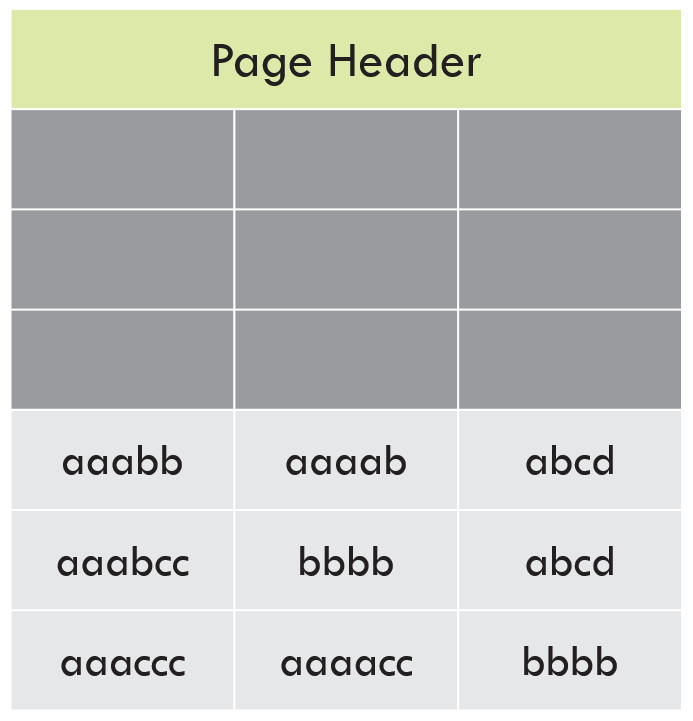 Uncompressed page
As the name suggests, prefix compression is applied to the START of the value. It will also do partial matches. The ideal prefix to select is a long value where the first bytes match many other values in that column, on that page.
Highlighted in green are the prefix values that have been identified for this page:
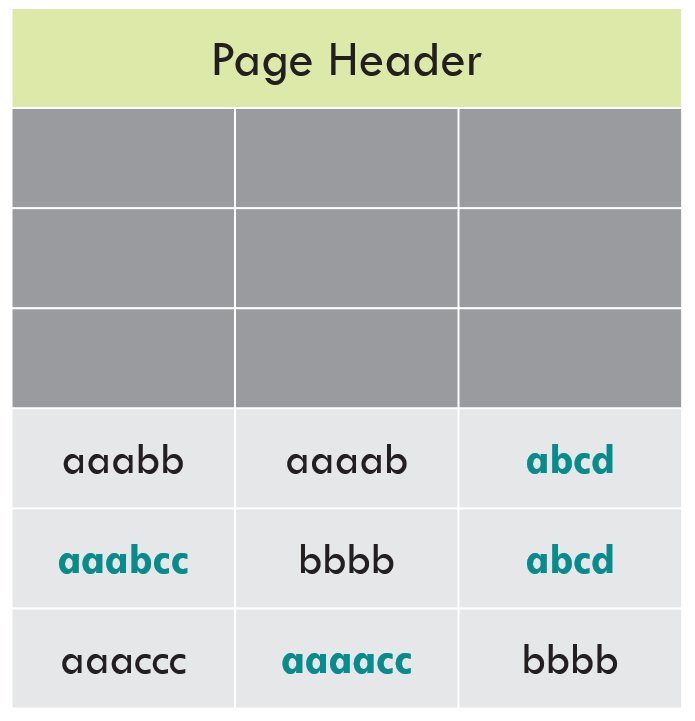 Values to use for prefix compression
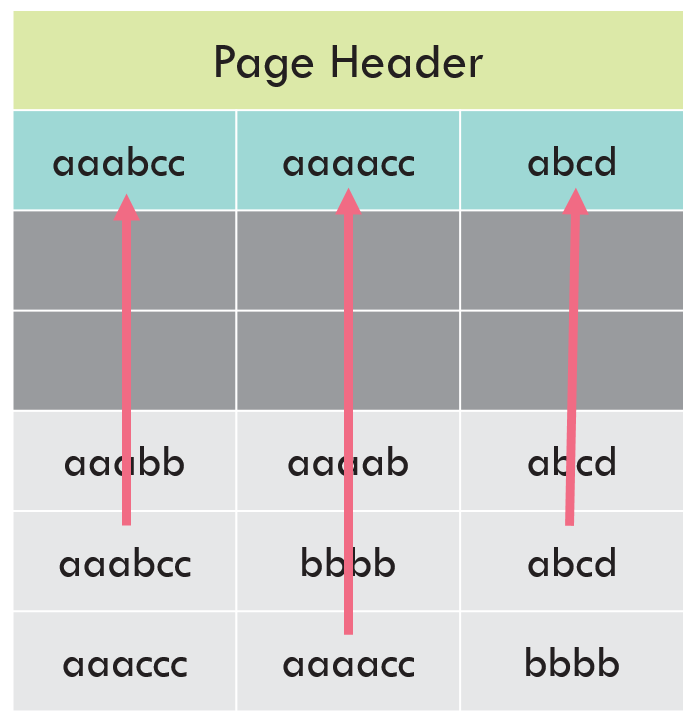 Create a row in the CI for the prefixes
Notice that some values have been completely replaced with the pointer–that’s because the prefix matches the full value. When there is a partial match, the pointer indicates how many characters (bytes) matched. If there’s no match, there is still overhead to indicate “this doesn’t match the prefix.”
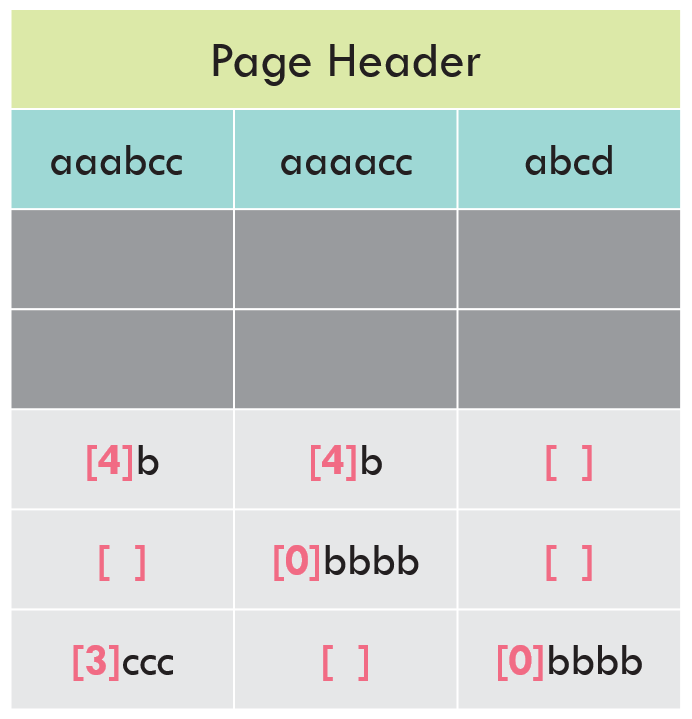 Prefixes are replaced with pointers to the CI
In this example “aaabb” (3 a’s + 3 b’s) in Col1 was prefix-compressed to “[4]b”. In Col2, “aaaab” (4 a’s plus 1 b) was prefix-compressed to “[4]b”. The original values were different, but the prefix-compressed values match. Dictionary compression will identify these as matches!
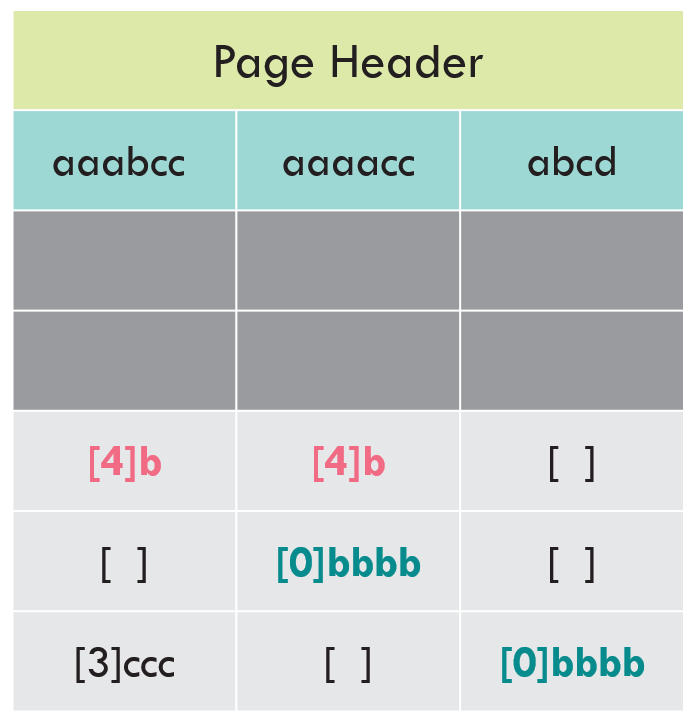 Values to use for dictionary compression
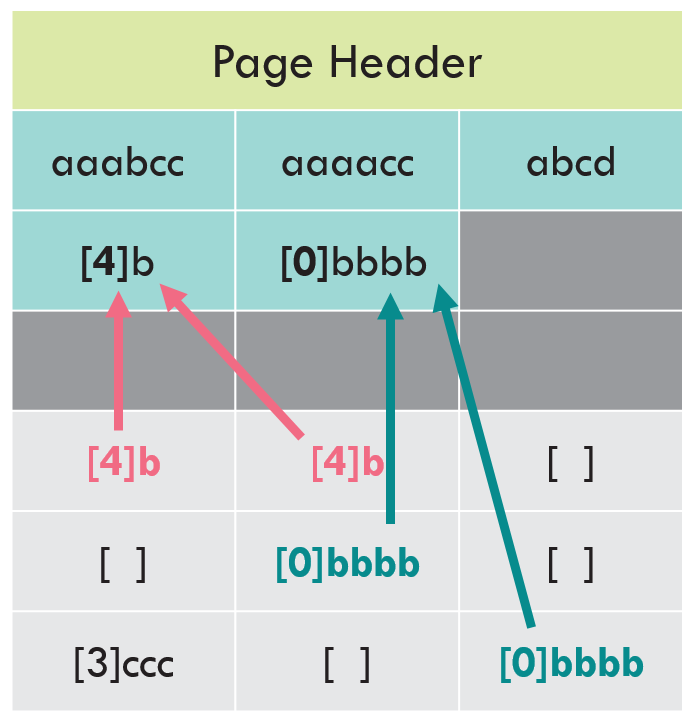 Dictionary compression values are written to the CI
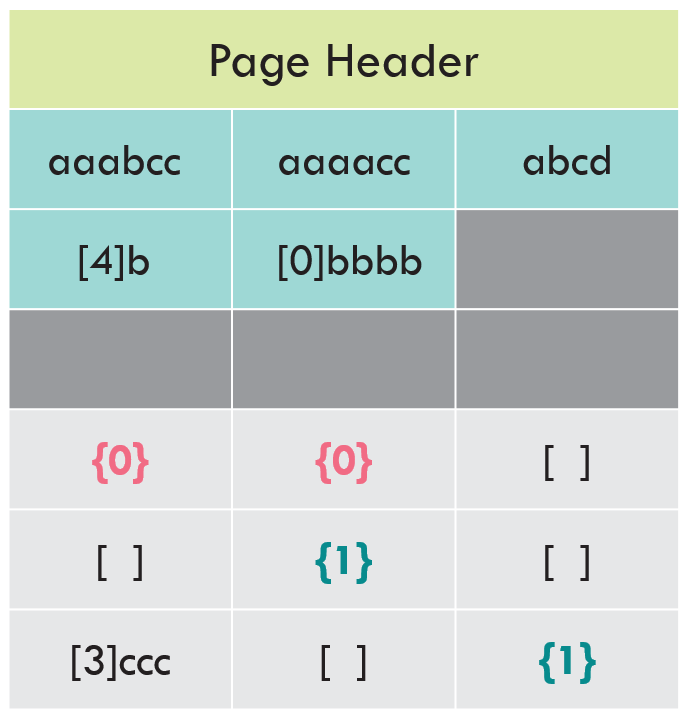 Dictionary compression complete
That’s it. We’re done. Take a look at the page before and after we applied these compression algorithms.
Before and after
You can get the sense that we saved room, but it’s hard to say exactly how much. If we count characters, we’ll see there are fewer characters used in the page-compressed page.
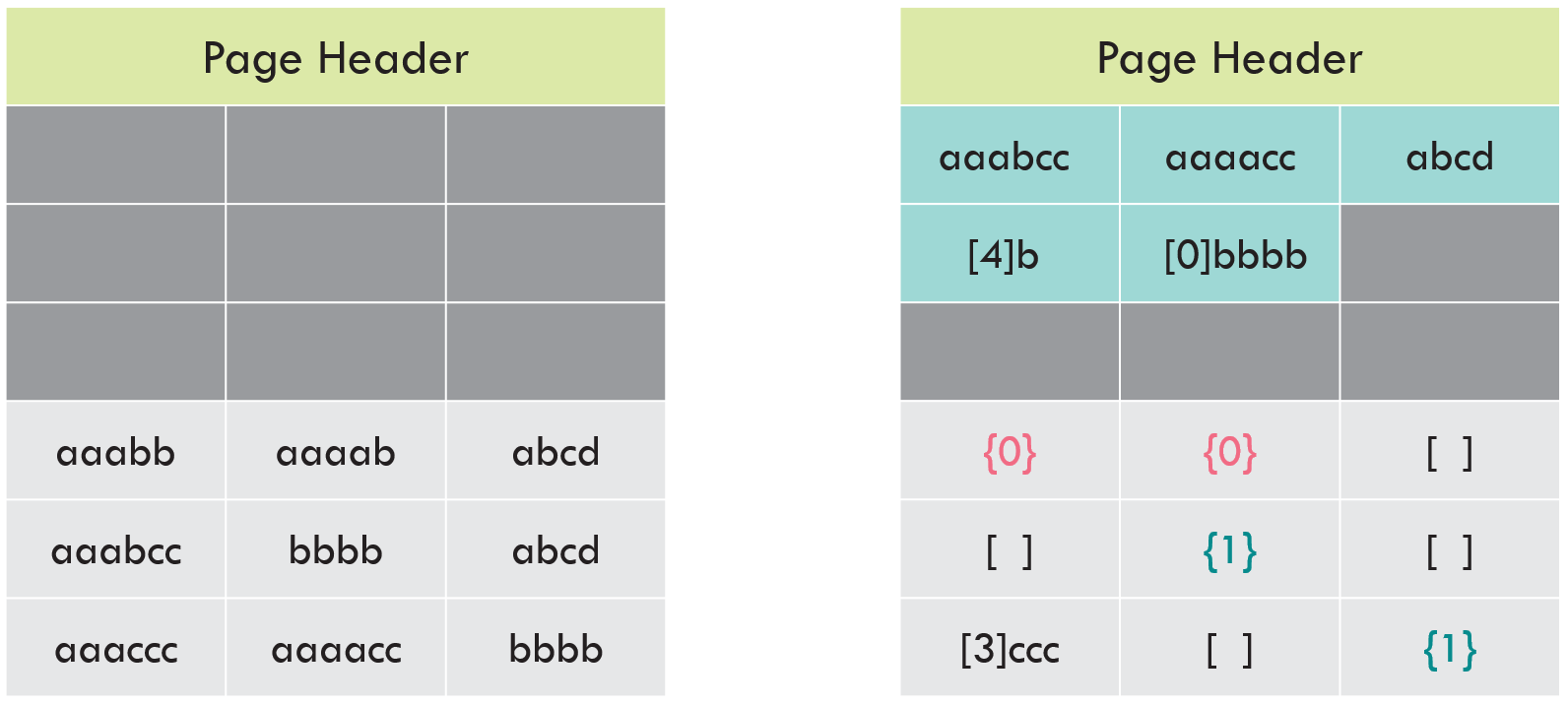 Before and after
Remember how I mentioned that pages aren’t actually written in a tabular, spreadsheet-like format? In reality, everything is squished together so that the page is information-dense. Lets represent that by using commas as field delimiters, and semicolons as row delimiters.
Without page compression, three rows used about 30% of the page. We’d (probably) fit about 6 more rows on the page before it was full.
With page compression, we’re still using about 30% of this page. However, the CI structure is using about 15% of the page, and the three rows are using about 15% of the page. We’d (probably) fit about 12 more rows on the page before it was full.
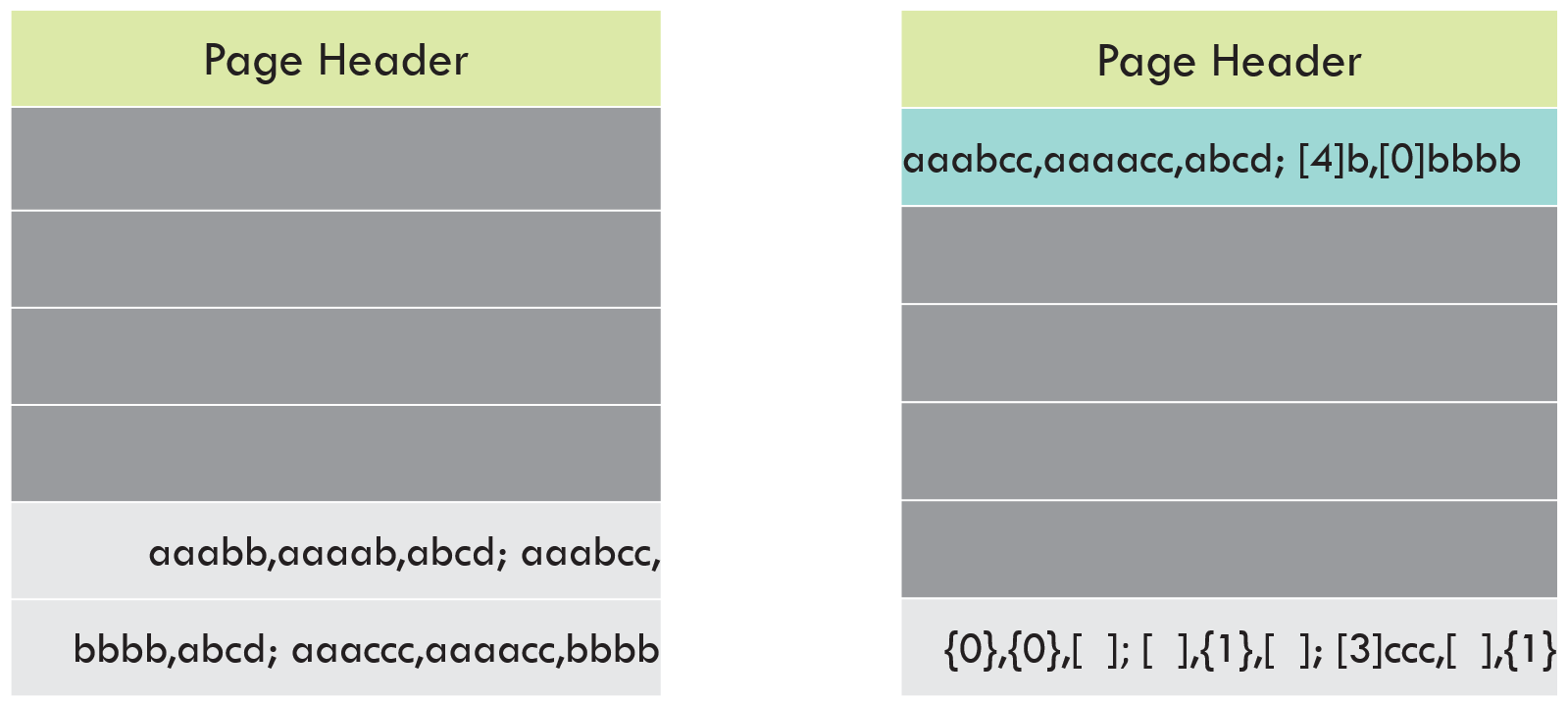 Before and after
You can use sys.dm_db_index_physical_stats to monitor if you have page-compressed indexes that are not benefiting from page compression.
SELECT DbName = db_name(database_id)
 ,TableName = object_name(object_id,database_id)
 ,IndexID = index_id
 ,IndexType = index_type_desc
 ,AllocUnitType = alloc_unit_type_desc
 ,IndexSizeKB = page_count * 8
 ,CompressedPages = compressed_page_count
 ,UncompressedPages = page_count - compressed_page_count
 ,AvgRecordSizeBytes = avg_record_size_in_bytes
FROM sys.dm_db_index_physical_stats(db_id('MyDb'),NULL,NULL,NULL,
          'Detailed') -- Have to use Detailed mode to get compression info
WHERE index_level = 0 --Only the leaf level of the index
ORDER BY compressed_page_count DESC,
 page_count DESC;
Conclusion
Just like row compression, you’ll find that page compression will often, but not always, save you space. Additionally, you may find that for certain indexes page compression falls back to row compression. When this happens, there is no added benenfit despite added cost–in these cases, you should use row compression instead. You need to know your data, know your schema, and do testing. Watch for those scenarios where page compression is not providing net benefit.